Take control of your browser right from your smartphone. With Clik, your smartphone could control Youtube on any browser without additional software or hardware. Clik turns your phone into a remote control for any screen with a browser. That means the screen must have a viable Internet connection (via Wi-Fi, cable, DSL, or wireless) with the ability to surf the Internet. Clik works best with Google Chrome, Safari, Mozilla Firefox and Internet Explorer.
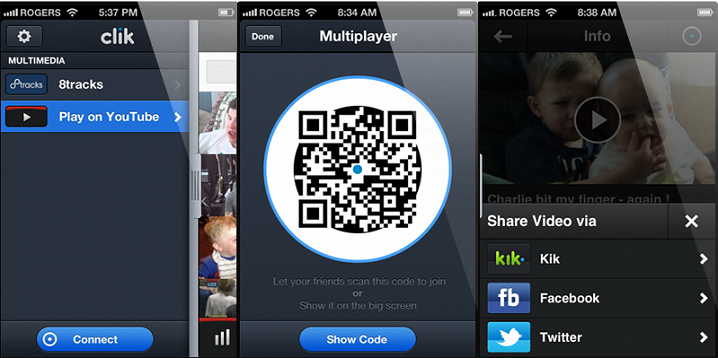
Clik offers controls for volume, play/pause, and a scrubber to fast-forward or rewind. You can also star your favorite videos for later retrieval.
How Clik works
Step 1: Download the FREE Clik app from the App Store or Google Play store.
Step 2: Enjoy videos on YouTube and music on 8tracks right on your phone.
Step 3: Connect to a screen with a browser to share the music and videos you love. Go to www.clikthis.com on your browser screen, tap Connect on your phone and scan the QR code.
Step 4: You’re now Clik’d in using your smartphone’s cellular or Wi-Fi connection.
Step 2: Enjoy videos on YouTube and music on 8tracks right on your phone.
Step 3: Connect to a screen with a browser to share the music and videos you love. Go to www.clikthis.com on your browser screen, tap Connect on your phone and scan the QR code.
Step 4: You’re now Clik’d in using your smartphone’s cellular or Wi-Fi connection.
Clik is available for free for the Android and iPhone.