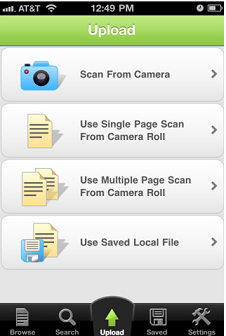
 OfficeDrop combines paper and digital documents online in a secure location, making them available from anywhere. The mobile app offers a number of ways users can take paper documents and scan and manage these documents to be stored in the cloud.
With OfficeDrop for iPhone & iPad, all of your converted paper and uploaded digital documents will be available for text searching, sharing and organization on your device and on the web at officedrop.com. There is a free plan that give you search, OCR and storage on your iPhone, iPad and browser! Scan on your computer and have your files available everywhere.
How it works
* Snap a picture with your iPhone camera and upload it to OfficeDrop
* OfficeDrop coverts your paper into text searchable PDFs.
* Start searching for, labeling, organizing, sharing, and interacting with your important paper and digital files from your phone, Windows desktop, iPad or web browser
* Use OfficeDrop’s ScanDrop software to scan your paper into the Officedrop web app from your computer and then access that paper when you’re on the go with OffficeDrop’s iPhone app